HaveIBeenPwned Breach? Here's What You Need to Know and Do
I hope it never happens to us, but data breaches are becoming increasingly common in today's digital age. If you've received an email notification from HaveIBeenPwned (HIBP) or check it for the first time yourself to find out that that one of your accounts has been compromised, There is nothing to panic but it's important to take immediate action to protect yourself and your personal information. In this blog post, I will guide you through the steps you should take to secure your accounts and minimize the damage of a breach.
Step 1: Check what information was breached
The first step you should take after receiving a notification from HIBP is to check what information was compromised in the breach. This could include personal information like your name, email address, and password, as well as financial information like credit card numbers or banking information. Knowing exactly what information was compromised will help you take the appropriate steps to secure your accounts and protect your personal information.
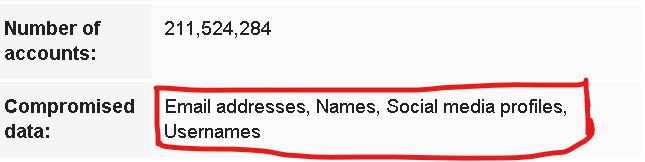
Here is another Picture if you check on website yourself:

Step 2: Making the information Outdated
Once you have a clear understanding of what information was compromised in the breach, the next step is to change your passwords for all affected accounts. This includes not only the account that was breached, but also any other accounts that use the same email address or phone number. Make sure to use strong, unique passwords for each account, and consider using a password manager to keep track of them all.
For Credit Cards, try to replace that card as soon as possible, put a transaction limit till that. the best practice is to use virtual cards for platforms, which you can replace instantly from the app, And best thing is they cost a little or no money.
It's also a good idea to enable two-factor authentication or multi-factor authentication (MFA) if available for both password and card transactions, this will add an extra layer of security to your accounts. The combination of a strong password and MFA can greatly reduce the risk of unauthorized access.
Step 3: Stay informed
Breaches happen all the time, so it's important to stay informed about the latest threats and how to protect yourself. Keep an eye on HIBP for updates on the breach and any new information that becomes available. You can also sign up for email notifications so that you'll be alerted if your email address appears in a future data breach.
A data breach can be a scary and stressful experience, but by following these steps and staying informed, you can minimize the damage and protect yourself from further harm. Remember, the most important thing is to act quickly and take control of the situation as soon as possible.
In Summary:
A data breach can be a scary and stressful experience, but by following these steps and staying informed, you can minimize the damage and protect yourself from further harm. Remember, the most important thing is to act quickly and take control of the situation as soon as possible.
Comments
Join the discussionNo comments yet. Be the first to comment.